As an Amazon Associate I earn from qualifying purchases. Picks are based on manufacturer specs, independent reviews and owner reports.
Our top picks
Short on time? Our top recommendation is the SanDisk Extreme Portable SSD V2 1TB.
Compare
At a glance
The traits that separate these picks, side by side.
In depth
The 3 best, explained
Why each made the cut, where it falls short, and who should buy it.
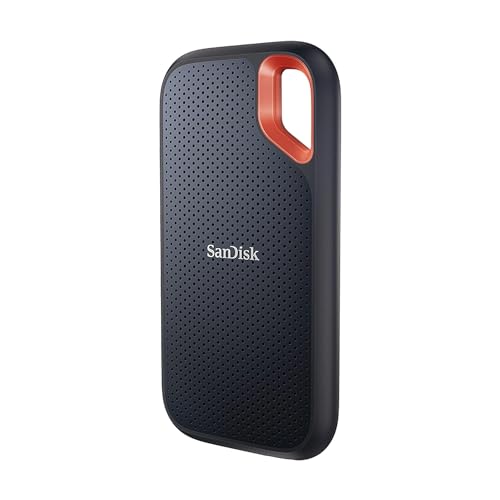
Best For Outdoor UseSanDisk
Best USB-C portable SSD for field use. The highlights are iP55 rated, survives accidental water exposure and dust in field use and rubber housing handles drops better than bare metal. The tradeoff: slightly larger than Samsung T7 for equivalent capacity.
- IP55 dust and water resistance
- Carabiner loop
- USB 3.2 Gen 2
- 1050 MB/s read
- Rubber housing
✓ Pros
- IP55 rated, survives accidental water exposure and dust in field use
- Rubber housing handles drops better than bare metal
- Carabiner loop for pack or belt attachment
✕ Cons
- Slightly larger than Samsung T7 for equivalent capacity
- No included USB-A cable
Crucial
2 Gen 2x2 SSD rated up to 2,100MB/s reads and 2,000MB/s writes, with IP55 protection.
✓ Pros
- Up to about 2,000MB/s on Gen 2x2 ports
- IP55 dust and water resistance
- Very compact
- Fast enough for 4K editing
✕ Cons
- Needs a USB 3.2 Gen 2x2 port for full speed
- Slower on Macs without Gen 2x2
- Gets warm during long transfers
Samsung
2 Gen 2x2 drive rated up to 2,000 MB/s, with a rugged shell and 5-year warranty.
✓ Pros
- Up to 2,000 MB/s on Gen 2x2 ports
- Sustained speeds for large video files
- Drop resistant up to 3 m
- 5-year limited warranty
✕ Cons
- Full speed needs a Gen 2x2 port most Macs lack
- Pricier than T7
- Gets warm under long writes
How we chose these picks
Every pick below earned its place through documented strengths, verified specifications, consistent praise in reputable reviews, and owner-feedback patterns. We don't sell placements, and we don't invent test scores.
Mistakes buyers often make
- Buying on brand name alone instead of matching features to your actual use case.
- Overpaying for headline specs you'll never use, define must-haves first.
- Ignoring size — compatibility, and ongoing costs (filters, accessories, refills).
- Trusting star ratings without reading what owners compla in about after 6 months.
How to choose: the factors that matter
Speed claims vs sustained speed: drive manufacturers advertise peak sequential read speeds that occur in a short burst.
For moving large video files, what matters is sustained speed after the first few gigabytes.
The Samsung T7 and SanDisk Extreme mainta in their rated speeds through a full 1TB write; some budget drives drop to 200-400 MB/s after cache saturation.
IP rating: the Samsung T7 has no IP rating.
If you work in the field, outdoor photography, construction sites, travel, the SanDisk Extreme's IP55 rating matters.
The bottom line
If you want the short answer: the top pick above suits most buyers, the value pick suits tight budgets, and the specialist picks suit specific needs. Match the pick to your use case, not to the hype.
FAQ
Common questions
What are the best USB-C portable SSDs 2026 right now?
Our top pick is the Samsung T7 Portable SSD 1TB (best usb c overall), because thinnest and most compact USB-C SSD available. The runner-up is the SanDisk Extreme Portable SSD V2 1TB (best for outdoor use), followed by the Crucial X9 1TB Portable SSD.
What is the best budget option among USB-C portable SSDs 2026?
Our best-value pick is the Crucial X9 1TB Portable SSD: consistently lower price than T7 and SanDisk Extreme for equivalent speed. Check the current price on Amazon, since deals change often.
Which of the USB-C portable SSDs 2026 should I buy?
It depends on what matters most to you. For usb c overall, choose the Samsung T7 Portable SSD 1TB. For outdoor use, choose the SanDisk Extreme Portable SSD V2 1TB. For budget usb c, choose the Crucial X9 1TB Portable SSD.
Is the Samsung T7 Portable SSD 1TB worth it?
For most buyers, yes. It ranks #1 in our USB-C portable SSDs 2026 research, though no IP rating, not rated for dust or water.
What is the difference between USB 3.2 Gen 2 and Thunderbolt for portable SSDs?
USB 3.2 Gen 2 provides 10 Gbps theoretical bandwidth, sufficient for portable SSD speeds up to approximately 1000 MB/s. Thunderbolt 3 and 4 provide 40 Gbps, sufficient for 3000+ MB/s NVMe SSDs. Most portable SSDs use USB 3.2 Gen 2 (1000 MB/s class). Thunderbolt-only portable SSDs (Samsung X5, LaCie Rugged Thunderbolt) are faster but require a Thunderbolt port, not available on most Windows laptops. For a MacBook Pro or a Windows laptop with Thunderbolt: a Thunderbolt SSD achieves 2000-3000 MB/s. For USB-C without Thunderbolt: USB 3.2 Gen 2 SSDs max at 1000 MB/s regardless of the drive's rated speed.
Does a USB-C portable SSD work with USB-A ports using an adapter?
A USB-C to USB-A adapter allows a USB-C portable SSD to connect to a USB-A port. Transfer speeds will be limited by the USB-A port's generation: USB 3.0 (5 Gbps) limits speeds to approximately 400 MB/s read. USB 3.1 Gen 2 (10 Gbps) allows full USB 3.2 Gen 2 SSD speeds. Check the laptop's USB-A port generation before relying on an adapter for full-speed transfers.
Do portable SSDs need external power?
Portable SSDs draw power from the USB connection. Unlike hard drives, SSDs have no spinning mechanism requiring high startup current. A USB-C portable SSD draws 0.5-1W during operation, well with in the USB power delivery capability of any laptop's USB-C port, including those without power delivery profiles.
Is a 500GB portable SSD enough?
For most use cases: 500GB is a useful minimum. A 500GB drive holds approximately 100 hours of 4K video footage, 150,000 RAW photos, or a complete backup of a standard laptop. For video editing workflows with large source files: 1-2TB is more practical.
Keep researching
Related guides & comparisons